

Optimal Graphics Settings for Monster Hunter Wilds Revealed
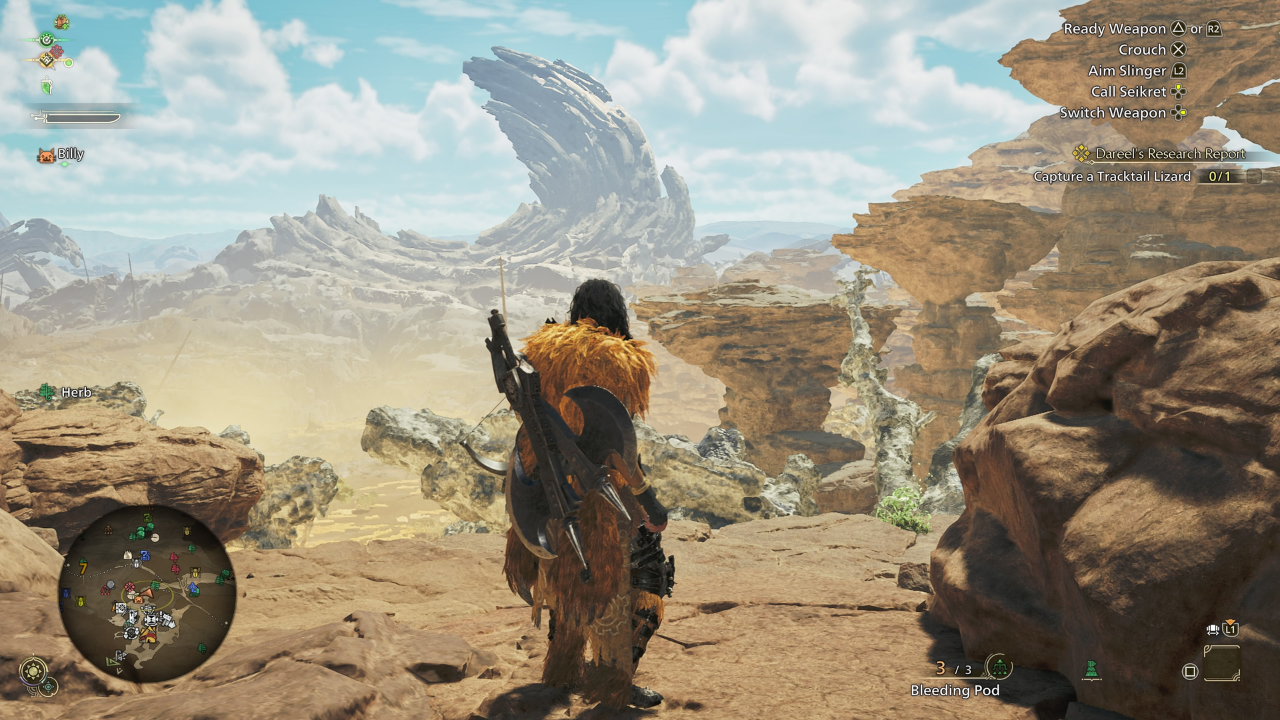
*Monster Hunter Wilds* captivates players with its breathtaking visuals, but achieving optimal performance without sacrificing visual quality can be a challenge. Here's a comprehensive guide to the best graphics settings for *Monster Hunter Wilds* to ensure you enjoy the game to its fullest potential.
Monster Hunter Wilds System Requirements
To achieve higher resolutions or max settings, you'll need a high-end GPU with ample VRAM and a robust CPU. For those eager to dive into *Monster Hunter Wilds*, you can find purchase options for your preferred platform below.
| Minimum Requirements | Recommended Requirements |
| OS: Windows 10 or newer CPU: Intel Core i5-10600 / AMD Ryzen 5 3600 Memory: 16GB RAM GPU: NVIDIA GTX 1660 Super / AMD Radeon RX 5600 XT (6GB VRAM) DirectX: Version 12 Storage: 140GB SSD required Performance Expectation: 30 FPS @ 1080p (upscaled from 720p) | OS: Windows 10 or newer CPU: Intel Core i5-11600K / AMD Ryzen 5 3600X Memory: 16GB RAM GPU: NVIDIA RTX 2070 Super / AMD RX 6700XT (8-12GB VRAM) DirectX: Version 12 Storage: 140GB SSD required Performance Expectation: 60 FPS @ 1080p (Frame Generation enabled) |
Monster Hunter Wilds Best Graphics Settings
Whether you're equipped with a top-tier RTX 4090 or a budget-friendly RX 5700XT, optimizing your graphics settings in *Monster Hunter Wilds* can significantly enhance your gaming experience. The difference between Ultra and High settings is often subtle visually but can markedly improve performance.
Display Settings
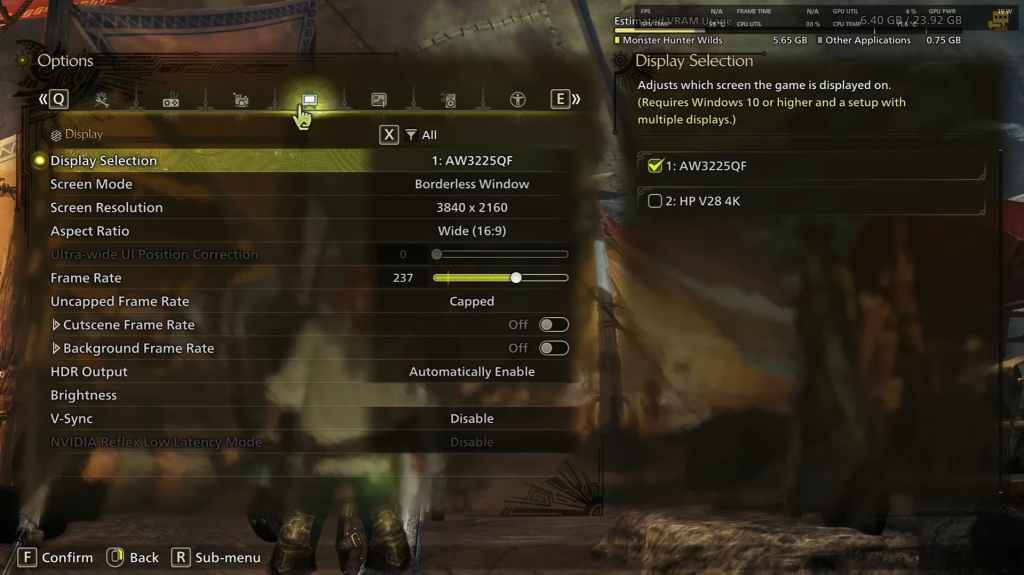
- Screen Mode: Choose based on your preference; Bordered Fullscreen is ideal if you frequently tab out.
- Resolution: Set to your monitor's native resolution.
- Frame Rate: Match your monitor's refresh rate (e.g., 144, 240).
- V-Sync: Turn off to minimize input lag.
Graphics Settings
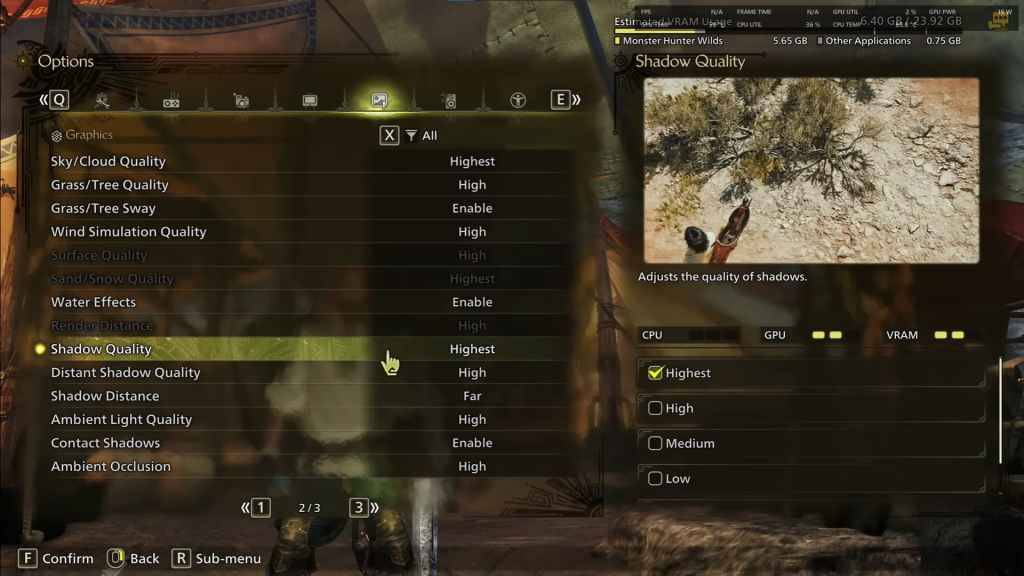
| Setting | Recommended | Description |
| Sky/Cloud Quality | Highest | Enhances atmospheric detail. |
| Grass/Tree Quality | High | Affects vegetation detail. |
| Grass/Tree Sway | Enabled | Adds realism but has a minor performance impact. |
| Wind Simulation Quality | High | Improves environmental effects. |
| Surface Quality | High | Enhances details on the ground and objects. |
| Sand/Snow Quality | Highest | Provides detailed terrain textures. |
| Water Effects | Enabled | Adds reflections and realism. |
| Render Distance | High | Determines how far objects are rendered. |
| Shadow Quality | Highest | Improves lighting but is resource-intensive. |
| Distant Shadow Quality | High | Enhances shadow detail at a distance. |
| Shadow Distance | Far | Controls how far shadows extend. |
| Ambient Light Quality | High | Enhances lighting effects. |
| Contact Shadows | Enabled | Enhances small object shadowing. |
| Ambient Occlusion | High | Improves depth in shadows. |
These settings prioritize visual fidelity, which is ideal since *Monster Hunter Wilds* is not a competitive game. However, every PC is unique, so feel free to adjust these settings if you're still experiencing low frame rates. The first adjustments to consider are lowering Shadows and Ambient Occlusion, as they are the most demanding. Reducing distant shadows and shadow distance can also boost FPS significantly. Additionally, lowering Water Effects and Sand/Snow Quality can help manage VRAM usage.
Best Settings for Different Builds
Not everyone has a high-end system capable of running games at 4K. Here are tailored settings for various build tiers to ensure smooth gameplay:
Mid-Range Build (GTX 1660 Super / RX 5600 XT)
- Resolution: 1080p
- Upscaling: AMD FSR 3.1 Balanced
- Frame Gen: Off
- Textures: Low
- Render Distance: Medium
- Shadow Quality: Medium
- Distant Shadow Quality: Low
- Grass/Tree Quality: Medium
- Wind Simulation: Low
- Ambient Occlusion: Medium
- Motion Blur: Off
- V-Sync: Off
- Expected Performance: ~40-50 FPS at 1080p
Recommended Build (RTX 2070 Super / RX 6700XT)
- Resolution: 1080p
- Upscaling: FSR 3.1 Balanced
- Frame Gen: Enabled
- Textures: Medium
- Render Distance: Medium
- Shadow Quality: High
- Distant Shadow Quality: Low
- Grass/Tree Quality: High
- Wind Simulation: High
- Ambient Occlusion: Medium
- Motion Blur: Off
- V-Sync: Off
- Expected Performance: ~60 FPS at 1080p
High-End Build (RTX 4080 / RX 7900 XTX)
- Resolution: 4K
- Upscaling: DLSS 3.7 Performance (NVIDIA) / FSR 3.1 (AMD)
- Frame Gen: Enabled
- Textures: High
- Render Distance: Highest
- Shadow Quality: High
- Distant Shadow Quality: High
- Grass/Tree Quality: High
- Wind Simulation: High
- Ambient Occlusion: High
- Motion Blur: Off
- V-Sync: Off
- Expected Performance: ~90-120 FPS at 4K (upscaled)
*Monster Hunter Wilds* offers a plethora of graphical options, but not all impact gameplay equally. If you're facing performance issues, consider reducing settings like shadows, ambient occlusion, and render distance. Budget users can leverage FSR 3 upscaling to improve FPS, while high-end builds can handle 4K settings with frame generation for an immersive experience.
For the best balance, opt for a mix of medium to high settings, enable upscaling, and adjust shadows and distance settings according to your hardware's capabilities.
And those are the optimal graphics settings for *Monster Hunter Wilds*.
*Monster Hunter Wilds is now available on PlayStation, Xbox, and PC.*
-
 Football Cup 2023Join the Football Cup 2023 and experience the thrill of soccer kicks in Soccer Strike football games.Football Cup 2023 immerses you in offline football matches for 2023 and invites you to compete in the Champions League of soccer games with this top-
 -
 equeo QD PlusMake learning fun! "Equeo QD Plus" presents educational content through engaging gameplay.Learning should be enjoyable! "Equeo QD Plus" is a digital educational game created by equeo GmbH, designed to teach through interactive play. Challenge yoursel
 -
 Vang Nails - DemoExperience a fully customized branded app designed exclusively for premium nail salons and spas, powered by Schedule Anyone.Elevate your nail salon's presence with a sophisticated, professionally branded mobile application from ScheduleAnyone – the p
 -
 G82 M4 Drift & Park SimulatorNominee for Best Racing Game in Car Games 2023!Prepare for unforgettable moments behind the wheel of incredible vehicles!Duster Convoy Simulator delivers an immersive 3D racing experience. This is one car racing game you must download to satisfy your
 -
 Logo maker AI Logo generatorAI Logo Maker: Generate logo designs from text to AI art icons. This AI logo creator turns your ideas into professional branding.AI-powered logo maker for every type of business.Step into the future of branding with AI Logo Maker—the simplest and mos
 -
 Cute Cat RPGStep into the paws of YOUR adorable feline in this charming RPG. Customize, train, and collect lovable cats.In Cute Cat RPG, become YOUR playful cat in a whimsical, stress-free adventure. Explore iconic global landmarks with your team of adorable kit




