

"How to Disable Subtitles in Avowed: A Step-by-Step Guide"
Subtitles are a widely appreciated accessibility feature, yet they're not for everyone. If you're playing *Avowed* and want to adjust your subtitle settings, here’s a straightforward guide on how to turn subtitles on or off.
How to Turn Subtitles On & Off in Avowed
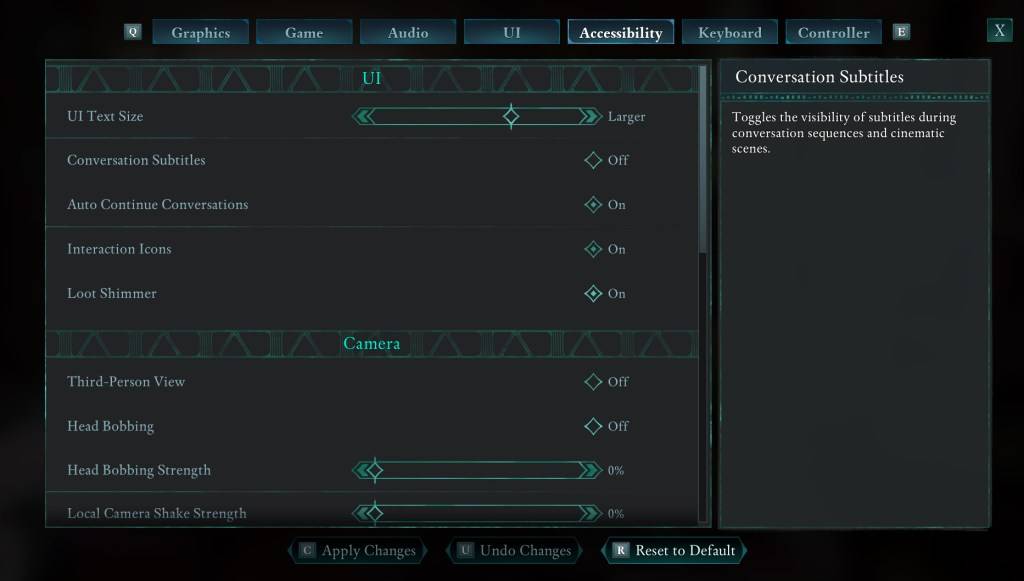
When you start *Avowed*, you'll encounter initial options for subtitles. If you accidentally choose a setting you don’t prefer, don't worry—there are two convenient places within the game where you can adjust these settings.
Navigate to the “Settings” menu, and select either the “UI” or “Accessibility” tab. Within these tabs, you'll find options for “Conversation Subtitles” and “Chatter Subtitles.” Adjust these settings to your liking. For clarity and ease, the “Accessibility” tab is recommended, but feel free to make changes wherever you find it most comfortable.
Why Don’t Some People Like Subtitles?
While I personally rely on subtitles to catch every word, some players find them distracting. It's all about personal preference. If you enjoy or require subtitles, feel free to keep them on; if they're not your thing, you can easily turn them off.
What Are Avowed’s Accessibility Options Like?
*Avowed* offers a range of standard accessibility features, although they may not be as extensive as some other titles. For subtitles, you can enhance readability by increasing their size, adjusting the background opacity, and setting the minimum display time on the screen.
Beyond subtitles, *Avowed* provides options to mitigate motion sickness, such as reducing camera shake and head bobbing. Additional accessibility features include increased aim assist, toggling crouch and sprint modes, and other adjustments that enhance playability for a broader audience.
And that’s how you can manage subtitles in *Avowed*.
*Avowed is available now.*
-
 Match TwoBoost Your Brain with a Memory Challenge! Exercise your mind with the timeless Memory card game! Your objective is simple yet challenging: find and match all identical pairs of cards on the board. About This Matching Game This classic memory challe
 -
 Little Anime Alchemist: CCGElements Throwdown - Perfect your deck-building skills and dominate the alchemy battlefield in this strategic TCG card game.Step into Little Anime Alchemist: CCG's enchanting world, where stunning anime visuals meet deep card-battle strategy. Gather
 -
 King of Solitaire by LKDEVViva a emoção do jogo de SOLITÁIRE GRATUITO nº 1 no Android com King of Solitaire by LKDEV! Se você é fã de jogos clássicos de cartas como Solitaire ou Paciência, este aplicativo é perfeito para você. Desenvolvido pela University of Games Sp. z o.o.
 -
 Glyph predictorNeed a reliable tool to anticipate glyph sequences for your favorite game? Meet the Glyph Predictor App! Launch the app and turn on overlay mode, tap refresh, choose your glyph count, and sketch your first glyph using the handwriting input overlay.
 -
 bug smash gameSmash, crush, and squish flying and crawling bugs in this incredibly addictive arcade game!Get Ready for the Ultimate Bug-Smashing Adventure!Join the thrilling world of Bug Smash Game, where tapping, smashing, and blasting through swarms of airborne
 -
 LIPOGRAMApp for the board game Lipogram.In Lipogram, your goal is to get others to guess words against the clock.You can say anything—except words containing a specific forbidden letter. Compete in versus mode with two teams, or work together in co-op to tac




