


| App Name | zTranslate: Translate subtitle |
| Developer | zSoft.asia |
| Category | Lifestyle |
| Size | 12.30M |
| Latest Version | 1.34 |
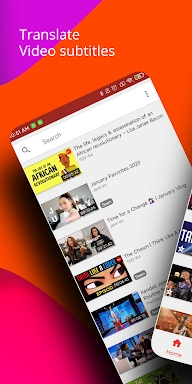
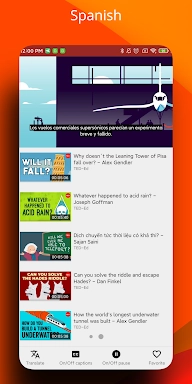
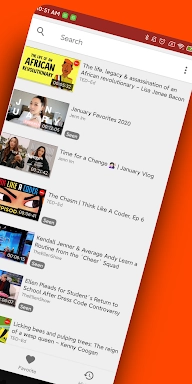


zTranslate - Your Ultimate Subtitle Translation Tool
zTranslate bridges language gaps in videos by transforming subtitles into 100+ languages, ideal for global viewers and language learners. Experience side-by-side subtitle comparisons, instant word translations, and speech practice tools for effective language acquisition.
Key Features
Comprehensive Subtitle Translations:
Enjoy video content in your native language with accurate translations across 110+ language options.
Language Learning Companion:
View both original and translated subtitles simultaneously to improve your comprehension skills in any target language.
Integrated Dictionary:
Simply tap any unfamiliar word to instantly access definitions and translations while watching videos.
Pronunciation Practice:
Master accents and fluency using our specialized shadowing method that lets you repeat after native speakers.
Common Questions
Cost Information:
The app is completely free with full functionality - no subscriptions or hidden charges.
Offline Accessibility:
Download videos with translated subtitles for uninterrupted learning anytime, anywhere.
Translation Quality:
Our advanced AI technology delivers precise, fluid translations that maintain the original meaning.
Getting Started Guide
- Installation: Download zTranslate from your app marketplace
- Launch: Open the app and select any video content
- Video Selection: Browse or search for desired videos
- Language Setup: Choose original and target subtitle languages
- Real-time Translation: Let the app process the subtitles
- Comparison Mode: Analyze both language versions simultaneously
- Vocabulary Builder: Tap words for instant translations
- Speech Training: Practice repeating audio clips aloud
- Personalization: Adjust text size, colors and other preferences
- Organization: Save favorite videos for quick access
-
 Clash of Clans Unveils Town Hall 17: Game-Changing Update Released
-
 Trainer's Pokémon Set to Resurface in Pokémon TCG in 2025
-
 Stalker 2: List Of All The Artifacts & How To Get Them
-
 Shadow of the Depth: Open Beta Now Available on Android
-
 Mastering Parry Techniques in Avowed: A Guide
-
 Breaking: Ubisoft Unveils Covert NFT Gaming Venture