

Home > Apps > Photography > Pixlr – Photo Editor

| App Name | Pixlr – Photo Editor |
| Category | Photography |
| Size | 74.70M |
| Latest Version | 3.5.5 |
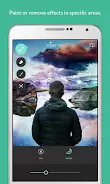

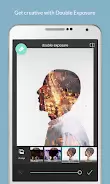
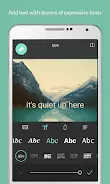


Unleash your creativity with Pixlr! This powerful photo editor boasts over 2 million free combinations of effects, overlays, and filters to personalize your photos. Effortlessly create stunning collages, instantly adjust colors, and apply cool effects like double exposure or stylized looks. Remove blemishes, add text, and select the perfect border to finalize your masterpiece. Seamless sharing and daily inspiration on social media make Pixlr the ideal tool for showcasing your artistic talent. Download Pixlr today and transform your photos!
madewithpixlr
Pixlr Features:
- Craft photo collages using various presets, grids, custom aspect ratios, and backgrounds.
- Enhance photo colors instantly with one-click AutoFix.
- Experiment with layered effects and adjustable transparency using Double Exposure.
- Apply stylish effects such as pencil sketches, posterization, and watercolors with the Stylize feature.
- Easily retouch photos by removing imperfections, correcting red-eye, smoothing skin, and whitening teeth.
- Choose from a wide selection of fonts to add text and complete your image with the perfect border.
Conclusion:
This user-friendly photo editor provides a comprehensive suite of tools to make your photos extraordinary. From collages and color correction to special effects, Pixlr has everything you need to create stunning edits and share them with the world. Download now and turn your photos into works of art!
-
PixelProMar 05,26Just tried Pixlr and it's absolutely amazing! The variety of filters and overlays is huge, and the interface is super intuitive. I made a cool collage in under 5 minutes. The double exposure effect looked professional. One tiny issue with export speed, but overall it's 5 stars! 🌟Galaxy S24+
-
 Clash of Clans Unveils Town Hall 17: Game-Changing Update Released
-
 Trainer's Pokémon Set to Resurface in Pokémon TCG in 2025
-
 Stalker 2: List Of All The Artifacts & How To Get Them
-
 Shadow of the Depth: Open Beta Now Available on Android
-
 Mastering Parry Techniques in Avowed: A Guide
-
 Breaking: Ubisoft Unveils Covert NFT Gaming Venture